Don Paypal

Paypal donation. 


I want to remind you that if you like my software, there is a way to make a donation via the Paypal button.

This will encourage me in this way that I set myself. Share as much as possible.

I’ve received 3 donations so far, and I must say I really appreciated it!

Appreciated the fact that you are happy with my work and the usefulness of this software.

It allows me to test new material, to mark a little the work done, but also to pay the website and the related costs.

I invest a lot of energy and time on this project. Thank you for appreciating my work.

Regards to all


Zigbee integrated in smartphoton version 3

Here we are, version 3 is coming.

The main new feature is:

To be able to remotely control via a 4 way switch the parameter 01.

Namely to switch it to UTI / SOL / SBU mode

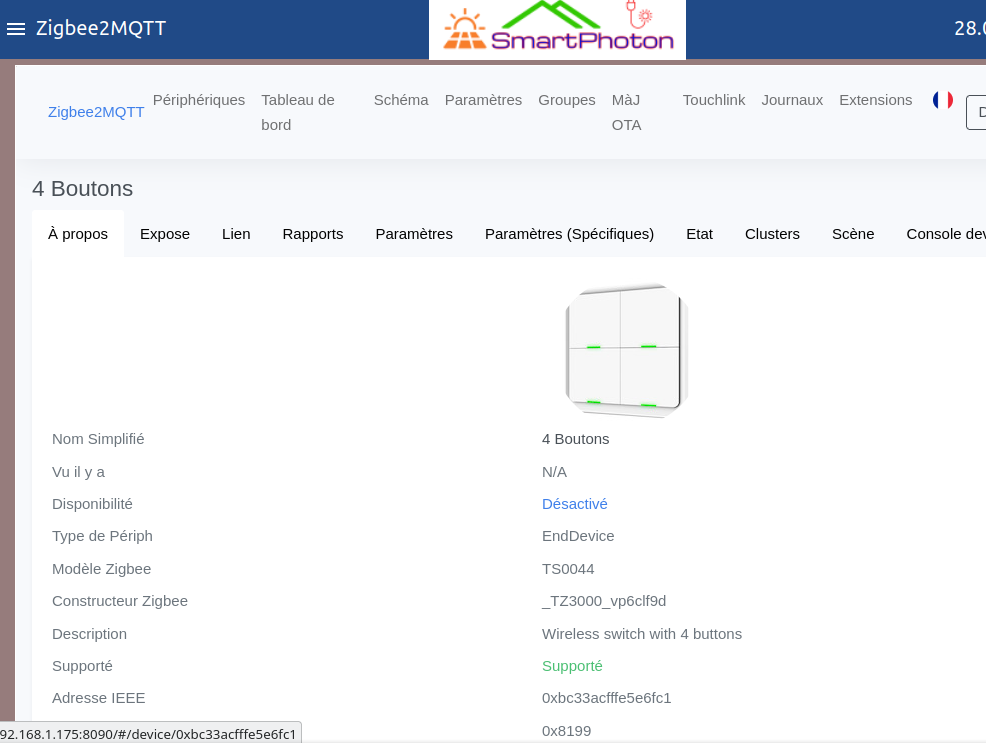
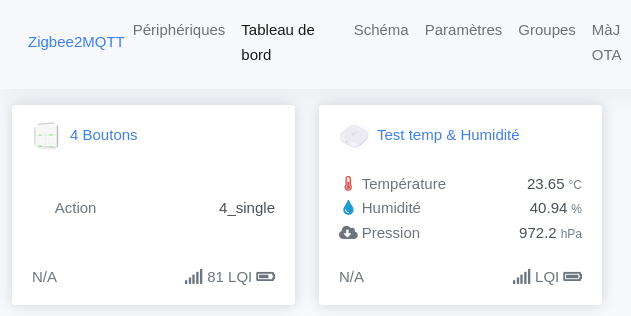
For this I integrated a Zigbee gateway in smartphoton.
Yes, that’s it, the home automation naturally integrates the inverter management software. It is an obvious marriage.

Jean was the first to test this solution, he often asked me for this feature. I hope he will be happy with it.

You can watch below this article which demonstrates the usefulness of this feature

Demo modification of parameters via 4-way wireless switchDémo modification de paramètres via interrupteur sans fil 4 voies

I used the wonderful software of zigbee2MQTT. Thanks to them for providing us with this kind of software!

In concrete terms, this is what will be required:

• 1 Zigbee switch of this type

• A Zigbee gateway to plug into the Raspberry

And that’s it!

In the software you can start and manage your Zigbee network via a dedicated page

A new video online!

A new video online! ! 📹

I decided to start explaining how to use Nodered to do home automation. This one deals with a relatively simple topic like gradually turning on/off an LED 💡

I’ve had quite a few requests along these lines, how do you do this or that?

So I’m taking the plunge by making this 1st video with a more polished presentation this time. But still artisanal, because it is my trademark.

You’ll see that I’m far from inverters on this one, but, it’s thanks to this kind of exercises that I was able to make the smartphoton software that you know now to use it at home.

Don’t hesitate to give me feedback if you like it or not in the comments below and/or on the Youtube page

[yotuwp type= »playlist » id= »PLJdQN_TTVjJ18jBjd4X6wczOa4UJSyKSq » ]

Accès depuis extérieur à sa maison

Je reçois assez souvent cette question:

Comment faire pour accéder à son tableau de bord onduleur depuis n’importe à l’extérieur de son réseau local (maison) ?

C’est une vaste question. Ça va beaucoup dépendre de vos compétences en informatique / réseaux

Pour ma part Il y a plusieurs pistes:

  1. La plus simple:         Aller dans son router ou sa box internet et créer des règles NAT. C’est à dire que l’on va faire une règle qui dit. Si accès depuis extérieur sur le port 1880, transfert les données vers l’intérieur sur l’adresse IP de smartphoton avec le port 1880. Inconvénient: Ce n’est absolument pas sécurisé, chacun qui connaît votre adresse externe va pouvoir voir vos données de votre onduleur
  2. Installer un reverse proxy externe (ex: Nginx):        c’est un peu ce qui est fait en 1. Sauf que l’ont peux ajouter un accès encrypté avec un ou plusieurs codes d’accès en plus. Compliqué mais très efficace !
  3. VPN:         Mettre en place un serveur VPN sur ton réseau et passer par lui pour ensuite joindre ton Pi. C’est l’une des solutions les plus efficace et sécurisée
  4. Zerotier      Smartphoton a déjà tout le logiciel installé, il suffit de créer un réseau zerotier pour soi-même et enregistrer vos machines que vous souhaitez joindre à celui-ci depuis l’extérieur, et hop on a un accès direct sans rien toucher à sa box ni son router. Top !
  5. Teamviewer, anydesk ou autres identiques
  6. Autres ?!

Ce que je préfère dans ce cas précis ?

La 3. et la 4.  Je pense que pour une personne sans trop de connaissances réseaux, la 4. est vraiment top. C’est par exemple possible pour moi de me connecter à votre pi si vous entrez le numéro de réseau que je pourrais vous donner à la demande. Il faut aussi que vous activiez cette fonction.

La 3 est bien plus technique mais offre plus de fonctionnalités tiers pour d’autres objectifs. J’utilise pour ma part.

Voilà pour mes connaissances. Il doit certainement et évidemment exister d’autres solutions que je ne connais pas.

N’hésitez pas en nous le présenter !


UTI / SOL / SBU what you wanted to know about parameter 01 of your inverter 💡

With his permission, I’m taking part of an email Jean sent me about the UTI / SOL / SBU parameters 💡

Many of us are wondering how to understand, analyze, approach and manage the functioning of these parameters. This is my case! With the data of the software we can see better what happens, but not so simple to understand why it does this or that.

That’s why Jean’s explanations are welcome! Do not hesitate to bring your stone to the building to share your knowledge. Welcome !


Here is a part of the mail:

« yes I spoke to you in my last message of the recurring problem to act permanently on these changes of paramount operation of these models of inverter … in fact I still have in service a model of 2019 but in 2,4KW, with those, the problem does not arise by choosing « solar first SBU » as soon as the solar energy is not sufficient, it passes on the networks not to draw on the batteries !…whereas on the new ones, it remains this « bypass » always present on the position SOL… In fact, according to what I studied while deconstructing them (yes, it’s my fault, I always have to know how it works, even if it’s new and not broken down !…😅), it’s that these machines are sold as « energy saving assistants », I’ll explain. …the system permanently monitors the consumption of the elements connected on it; of course it will give priority to the sun if it is available but never at 100%! in the measure of 2/3-1/3 …moreover at this level, the assistance to the lack of solar energy is done with the help of the network edf or the park of battery with the help of thyristors and transistors Cmos but never at the level of a relay for the assistance…in fact, you do not notice it! To make it simple, a basic example, it’s like if you fill a basin with several water taps, opening more or less these taps but without ever closing them completely except in the limits! a real technological prowess thanks to the management by µ-processors…which was not the case in the first generations or there we made intervene relays. So all this to say that if you don’t intervene manually to force the recent models to pass on SBU, i.e. only the PV, well you use them (like the 3/4 of the solar customers besides, except for the « nitpickers like us ») as sources of assistance!…so either you intervene manually and regularly at the level of the parameters, or you intervene more easily remotely thanks to your SmartPhoton software! ( Jean Luc hip hip hip Hourra ! ) but, there is a « but » only a passionate of technology will make the step !…😅 hence my previous mail on the ease of pressing a button within reach of the simple mortal !. That’s why your short video presentation of such a means is to be developed from A to Z in a video .( or several for that matter ..) right now for example I’m watching and trying to assimilate the videos on Nodred, some detail the steps in a thorough way so that those who watch understand . ..but I personally have a hard time following because I don’t have the capacity to assimilate this technology since I’m not 20 years old anymore and I don’t have much experience on « this way of talking » to a machine…it’s not like electronics which I’ve been immersed in since I was a child… 😀😅 and so I think that if you start making videos on the subject by detailing your project you would surely attract an audience by referring them to your site« 

The video is this one:

[yotuwp type= »videos » id= »cuvNBDqRrxo » ]

Smartphoton works virtualized under Windows / Linux / MacOS ! 👻

It’s done.

Smartphoton works on something else than a Raspberry Pi. It has been virtualized 👻

This kind of installation will allow to install smartphoton on a laptop for example.

This in the form of a virtual machine hosted under Windows 10 or Linux or even MacOS (to be tested)

For this, you will have to install VirtualBox from Oracle (free) on the chosen machine.


The advantage of this is that you no longer need a Rapsberry Pi to run my software.

The disadvantage is that you have to leave your laptop near the inverter and that it will consume a lot of energy compared to a Pi.

Here is the installation documentation if you are curious:

[pdf-embedder url= »https://smartphoton.ch/wp-content/uploads/2022/01/Installer-VirtualBox-dans-W10-pour-smartphoton-VM.pdf »]


💥 A surprise for smartphoton users 🎉

💥 A surprise for smartphoton users

My software also allows you to create your own graphics!

Yes, you read that right. That’s the surprise 😊

Point your browser to the address of your Raspberry and add :3000 at the end.

For example : http://192.168.1.30:3000

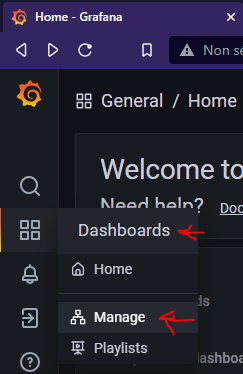
You will get a screen like this, then click on the connection door (red arrow)

Use the user : invite@foo.com et domo2020

You will now be able to use a very powerful tool called Grafana.

With it, you will be able to build your own custom graphics.

However, you will have to remember to save them if you ever update smartphoton.

I have not yet planned a backup / restore for this part.

In the meantime, you can find some charts that I had already made by clicking on Dashboard & Manage.

See below

The graphics are here:

Nice! Right?!

What do you think about it ?

Example of a new graphic:

Des nouvelles en ce début d’année

💫 First of all thank you for your Wishes 💫

I wanted to share with you the information that we are close to 10 people using this software.

The 10th person could be in Mali (in contact since yesterday). That would be really cool.

The video online on YouTube has exceeded 1500 views in France alone. This shows that there is interest in inverters of our type.

Now I want to ask you if you have any ideas – needs – specific projects to add to this software.

I have the feeling that it could be used with a home automation part which is perfectly complementary.

Moreover it is what some of us already do. Your ideas, proposals are welcome.

Oh yes, a good news, Michel who is the first smartphoton user starts by himself to write code with Node Red which is the engine I used to build the software. I encourage you to dive into it if like me you want to develop without any programming knowledge.

It would be cool to integrate your code into mine 😎


Project in progress:

Still with Michel, we are working on a « solar detector », this one will give us the possible amount of energy that our solar panels could provide. This detector will be placed right next to the field of panels to be in the same conditions.

The objective is to be able to activate a load (ex: water heater, electric car, PAC, etc) only if the potential of our panels is able to cover these new consumers. Currently, we can just switch on and see passively if they can provide enough energy or not. It is not possible in this situation to automate anything without making a gas factory.

Best thoughts.

/Jean-Luc

Superwatt inverter TT system of the neutral not to the standards in autonomous mode / Off Grid (2/2)

Resolution of the floating neutral phenomenon when some inverters go into autonomous mode.

**** Warning: electricity is dangerous because it is invisible, silent and odorless.

The consequences can be fatal if you do not master this subject ****

The neutral is earthed via the relay activated when the coil does not detect any current flow.

So this time it is in standard EDF TT mode. 0V on the blue and 230V on the phase.
This allows your electrical box to find its initial function and thus allows the differentials to detect

a leakage current and then to break if necessary during a fault.

references:
Switch alternating current sensor:
ContacteurAlternating:

Vidéo:[yotuwp type= »videos » id= »3dY0adBYoRc » ]